
Coding is quickly becoming one of the most essential skills for the next generation. From everyday devices to complex innovations, technology is everywhere. Teaching kids to code early on gives them an edge in understanding how the digital world works and prepares them for future success. But how does coding for children align with the Montessori philosophy?
Surprisingly, coding and the Montessori curriculum have a lot in common. Just as Montessori activities encourage children to explore concepts at their own pace, coding invites them to experiment, learn from mistakes, and find solutions on their own terms. Whether they’re arranging blocks of code or building sequences step by step, children naturally engage in problem-solving and logical thinking, just like they do when constructing a tower with blocks or organizing beads in the decimal system.
The Montessori approach puts a strong emphasis on balancing new skills with real-world, sensory experiences. Coding shouldn’t be an exception. While touchscreens and digital tools have their place, the Montessori method reminds us to avoid over-reliance on screens. Instead, children thrive when given a variety of learning experiences, combining hands-on activities with occasional technology use.
How can parents introduce coding without overwhelming their children with screen time? And is it even possible to teach coding without a computer? The answer lies in finding the right balance and using Montessori-aligned tools and methods.
As we move forward, we’ll explore why coding is such a natural fit for Montessori learning, how to avoid potential downsides, and ways to teach coding without screens at all.
Why coding fits the Montessori method
Ever watched a child playing with LEGO bricks, assembling random pieces? Their curiosity drives them to try, test, and eventually succeed. Coding works in much the same way — it’s an open-ended process of problem-solving and discovery. This makes it a perfect match for Montessori education, which is less about screens and more about thinking, creating, and building solutions from scratch.
Hands-on learning
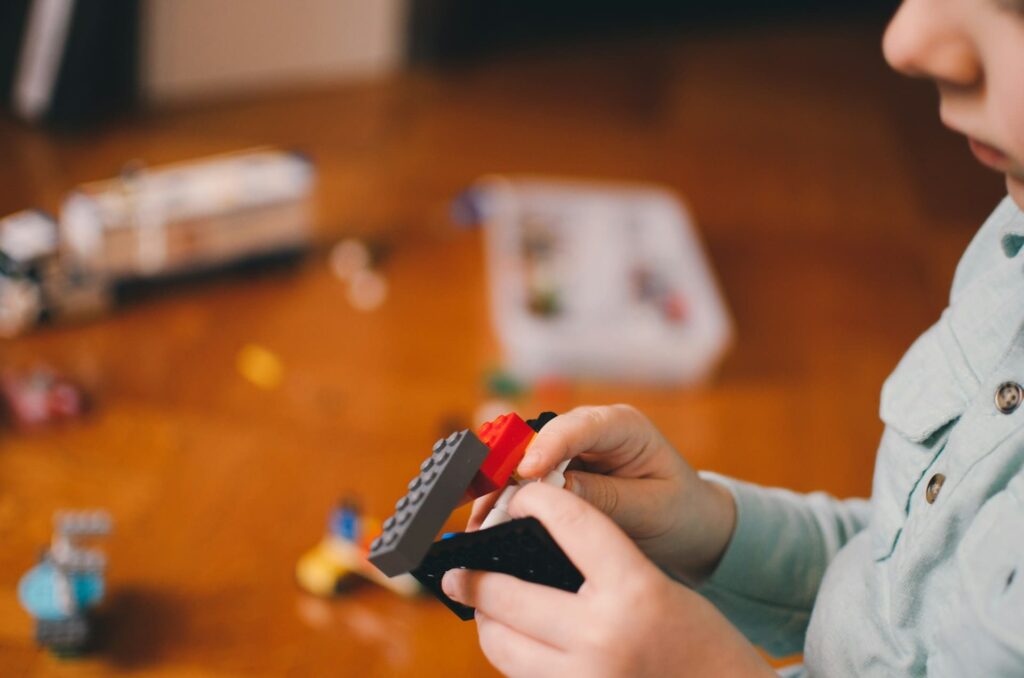
Coding may seem like a digital activity, but at its core, it’s deeply rooted in tactile experiences. Think of coding as assembling a puzzle or building a Lego structure — every piece must fit logically to create the desired result.
Montessori materials like the Pink Tower or Number Rods work similarly, requiring children to engage in physical, step-by-step processes to achieve a goal. Coding can mirror this experience, especially when introduced through Montessori-aligned tools, where children physically manipulate coding blocks to learn sequencing and logic.
Child-led exploration
What if your child could create their own interactive story or design a game? In coding, there are no limits to what they can build, and that freedom aligns perfectly with Montessori’s child-led philosophy. Rather than following rigid instructions, children can explore coding concepts on their own terms. They take the lead, choosing projects that spark their interest, which fosters independence and critical thinking skills. Coding becomes a journey of discovery — full of “aha!” moments that build confidence along the way.
Sequential learning
Montessori education emphasizes sequential learning — moving from simple to complex, step by step. Coding follows the same approach. Children begin with basic concepts like sequences and patterns before moving on to loops, conditions, and more advanced problem-solving. Each new concept builds on the last, just like Montessori materials guide children from early sensorial exercises to complex mathematical reasoning.
By combining interactive activities with coding principles, children gain a solid foundation in logical thinking while having fun. It’s a powerful way to teach problem-solving skills while reinforcing Montessori values.
But as exciting as coding can be, it’s crucial to stay mindful of potential downsides. How can we maintain Montessori’s focus on sensory-rich, real-world learning while keeping screen time in check? Up next, we’ll explore the challenges and share tips for striking the perfect balance.
Downsides and screentime considerations of coding for children
Coding is exciting and opens up a world of creativity for children, but it’s important to remember one thing — balance is key. While technology can be a powerful tool for learning, too much screen time can have negative effects on a child’s development. Montessori education, with its focus on tactile, real-world experiences, offers a valuable reminder to prioritize physical activity and sensory exploration first.

Coding for children is associated with the risks of overexposure
Have you ever noticed how prolonged screen time can lead to overstimulation and restlessness? Studies show that excessive screen use can impact a child’s sleep, attention span, and emotional regulation. While coding itself is a fantastic skill to develop, spending hours in front of a screen isn’t ideal for young minds. Montessori philosophy emphasizes a holistic approach to learning — one that nurtures the body and mind together. Coding should be part of a balanced learning experience, not the only focus.
Montessori’s take on technology
Montessori education is deeply rooted in real-world learning experiences. Children learn by touching, manipulating, and observing objects in their environment. These activities engage multiple senses and promote concentration, coordination, and independence. Technology should enhance, not replace, these essential experiences.
That’s why Montessori-inspired coding often involves screen-free tools like robotics kits, wooden coding blocks, or simple board games that tangibly introduce coding concepts. When screens are used, they should serve a clear purpose — one that aligns with the child’s developmental needs and fosters creativity rather than passive consumption.
Balance and moderation
Montessori educators recommend moderation and purposeful use of technology. Here are some tips for maintaining a healthy balance:
- Set clear boundaries: Create a daily schedule that limits screen use to specific times. How much screen time is too much? Read here: Screen time limits by age.
- Prioritize active play and hands-on learning: Balance coding activities with outdoor play, arts and crafts, and real-world problem-solving.
- Be present: Engage with your child during screen-based learning. Ask questions and explore together to create a shared experience.
- Choose high-quality activities: Opt for educational apps or screen-free coding tools that align with Montessori principles.
When used thoughtfully, technology can be an enriching addition to your child’s learning journey. The goal is not to avoid it completely but to find a healthy balance — one that keeps your child’s creativity and curiosity alive.
So, how do you teach coding without relying on computers and screens? Surprisingly, it’s easier than you might think. From unplugged coding games to interactive robotics kits, there are plenty of screen-free ways to introduce your child to coding.
Teaching coding for kids without computers according to Montessori
Screen-free coding activities are not only possible but also perfectly aligned with Montessori principles. By introducing coding concepts through tactile play and real-world experiences, children can develop critical thinking and problem-solving skills without ever touching a screen.
Unplugged coding activities for children
Think coding has to involve complex software? Not at all! Simple, screen-free coding activities are everywhere. Games that focus on sequencing, logic, and problem-solving can introduce children to coding fundamentals in a playful and tactile way.
For example, set up a simple maze on the floor and ask your child to “code” their stuffed animal’s movements to reach the finish line. Or use colored blocks to teach sequencing by arranging them in a specific order to represent steps in a process. These activities help children grasp core coding concepts like instructions, loops, and patterns — all without a computer.
Montessori-friendly coding toys for kids
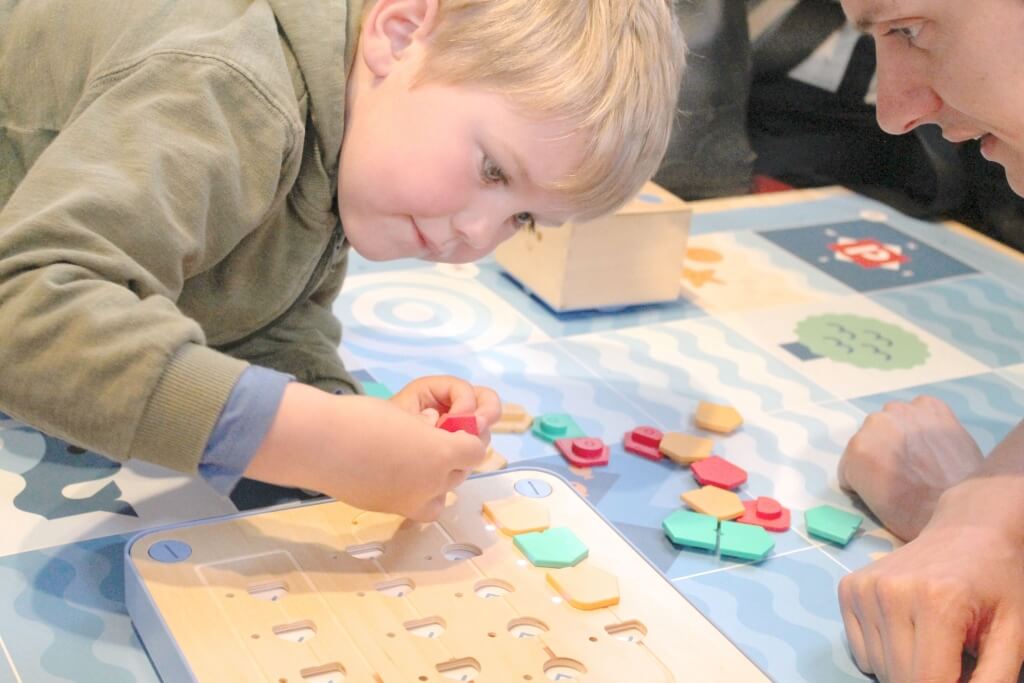
If you’re looking for ready-made solutions, there are plenty of Montessori materials and friendly coding toys available that blend physical play with essential coding concepts. Cubetto, for instance, is a wooden robot that introduces coding through physical blocks.
Children arrange and place these blocks in a control board to create sequences, which guide Cubetto on various adventures across story maps. Each block represents a coding command — forward, left, right, or a loop — helping children grasp programming logic while encouraging real-world exploration and problem-solving. With no screens involved, Cubetto makes coding both intuitive and fun, while promoting spatial awareness and critical thinking.
Another great tool is Colori, a color-based coding toy that seamlessly combines sensory play with foundational coding skills. Designed specifically with Montessori principles in mind, Colori invites children to experiment with cause and effect by using color tiles as coding commands. As they build sequences of color patterns, they engage multiple senses, improving their understanding of coding logic while reinforcing visual and tactile learning. Colori’s open-ended play format encourages creativity, making it ideal for fostering curiosity and exploration without rigid outcomes.
Some tools are not fully aligned with traditional Montessori standards. However, they still offers a great alternative to touchscreens for introducing coding concepts. Bee-Bot, for example, is a programmable robot shaped like a bee that introduces children to coding in a playful, tactile way. It’s simple to use — children press directional buttons on the Bee-Bot’s back to program a sequence of movements. With each press, they’re learning coding fundamentals like sequencing, estimation, and problem-solving. Bee-Bot is often used with themed mats that turn coding into an adventure, such as navigating a farm, exploring numbers, or finding letters in an alphabet maze.
Code & Go Robot Mouse is another friendly toy that provides an engaging, hands-on introduction to coding concepts. The activity begins with kids designing a maze using interlocking pieces, and then programming the mouse’s movements to reach the cheese. Each step teaches essential coding concepts while reinforcing spatial awareness and sequencing skills.
Because it’s a physical game, children can see the direct results of their coding decisions, making the experience engaging and rewarding. For added fun, the set includes multiple maze pieces, allowing endless customization and increasing the level of challenge as children grow.
These toys transform coding into a physical, interactive experience — perfect for Montessori learners. By engaging in tactile play, children build essential cognitive skills without relying on screens, all while having a blast exploring cause-and-effect relationships, problem-solving, and logical thinking.
Montessori coding for children in everyday life
But coding isn’t just for toys and games; it’s everywhere in our daily routines. Have you ever followed a recipe? That’s coding! It’s a step-by-step process that must be followed in sequence to achieve the desired result. Forget an ingredient or add steps in the wrong order, and the outcome won’t be what you expected — a perfect example of debugging in action.
Sorting laundry by color or size? That’s another coding concept — categorization. You’re teaching your child how to group items based on shared characteristics, much like a computer organizes data. Even creating a morning routine, such as brushing teeth, getting dressed, and packing a bag, is a real-life algorithm. These repeated sequences teach children how to think logically and plan ahead.
Look for opportunities in everyday tasks to explore coding concepts naturally. For instance, setting the table can teach sequencing: napkin, plate, fork, spoon — every item in its proper place. Building with blocks introduces patterns and structures, while playing a game of Simon Says is a fun way to teach conditional logic (“If I say Simon says, then you follow the instruction. If not, you don’t move.”).
Nature also offers wonderful examples of coding in action. Leaves change color in the fall following a predictable sequence, and flowers bloom in repeating patterns. When children observe and discuss these patterns, they begin to recognize the underlying logic that coding mirrors. By pointing out these patterns, sequences, and logical connections in daily life, you help your child see coding not as a complex digital skill but as something intuitive and deeply connected to their everyday experiences.
With the right tools and activities, coding can become an exciting and enriching part of your child’s Montessori journey. The goal is to inspire curiosity and encourage hands-on learning — one code block (or puzzle piece!) at a time. But what is the right time to start?
When to start coding for kids, the Montessori way
Introducing coding to children requires thoughtful timing, especially when following the Montessori philosophy and considering recommended screen time limits. The key is to align coding activities with each developmental stage, ensuring they enhance, not disrupt, natural growth and learning processes.

0–2 years: Focus on sensory play and exploration
At this stage, screen time is not recommended. Instead of digital coding activities, focus on building sensory and motor skills through tactile play. Simple activities like sorting objects, stacking blocks, and exploring shapes and colors lay the foundation for future coding skills.
Tips:
- Encourage exploration with open-ended toys such as stacking cups or sorting boxes.
- Sing pattern-based songs and clapping games to develop sequencing and rhythm recognition.
3–5 years: Introduce simple logic and problem-solving
Children in this age group can engage in early coding concepts without screens. Unplugged coding activities, such as following movement sequences (“jump, clap, spin”), help develop logical thinking and sequencing skills. Montessori-friendly coding toys offer an interactive way to introduce basic programming without exceeding the recommended 25–60 minutes of supervised screen time.
Tips:
- Use coding toys with physical blocks to build problem-solving skills.
- Create obstacle courses that require planning and step-by-step navigation to reinforce sequencing concepts.
- Introduce board games that promote logic and strategy.
6–12 years: Expand to structured coding concepts
This is the ideal age to introduce more structured coding activities, focusing on logic, sequencing, and computational thinking. Screen time can range from 1–2 hours per day, with an emphasis on educational content. Children at this stage can start learning simple coding languages or use visual programming platforms like Scratch. Montessori classrooms may integrate robotics kits and coding clubs to foster collaborative learning.
Tips:
- Use screen-free coding activities, but gradually introduce supervised computer-based coding projects.
- Encourage real-world coding examples, like building simple robots or creating digital stories.
- Focus on project-based learning to let children design and build their own coding projects.
13–18 Years: Advanced coding for children
At this stage, coding can become a key focus, as teens develop advanced skills and explore real-world applications like app development, robotics, and data analysis. Screen time can extend to 2–3 hours per day, balancing educational and social use. Coding can be integrated into creative projects like game design, digital art, and website development.
Tips:
- Encourage participation in coding competitions or hackathons to build teamwork and creativity.
- Support self-directed coding projects that align with your child’s interests.
- Discuss ethical technology use and online safety as coding activities grow more complex.
By following these developmental stages and Montessori principles, coding becomes a natural part of your child’s learning journey. Whether through everyday activities, toys, or structured coding lessons, the goal is to introduce coding in a way that respects your child’s growth and curiosity while maintaining a healthy balance with technology.
Final words: Montessori coding for children is all about finding the right balance
Introducing coding to children can be an exciting and rewarding journey. Done the right way, it builds essential skills like problem-solving, logical thinking, and creativity — all while encouraging self-expression. But just like every other part of a child’s learning experience, balance is key. How do you strike that balance? By embracing technology as a tool for discovery, not a substitute for hands-on, real-world learning.
The Montessori approach reminds us to focus on the child’s holistic development — mind, body, and senses working in harmony. Coding can be a part of this journey if introduced thoughtfully, with plenty of room for tactile experiences, outdoor play, and collaborative activities. Technology should serve to enhance your child’s education, not overshadow it.
The best part? You can nurture a love for coding without relying on excessive screen time. From unplugged coding activities to Montessori-inspired coding toys, there are countless ways to build foundational coding skills without a screen in sight. And when screens are used, ensure they’re purposeful and balanced with plenty of other activities that nurture your child’s development.
Remember, the goal isn’t to create the next Silicon Valley programmer at age five. It’s about giving your child the tools to explore the world with curiosity and confidence. Coding is just one part of that larger picture — an exciting one, but not the only one.
Want to learn more about how coding principles align with Montessori education? Visit the Montessori Family Center to explore the benefits of Montessori learning and how it nurtures children’s growth, independence, and creativity in every stage of development.
FAQ: Coding for kids, the Montessori way
1. What age should children start learning coding in a Montessori environment?
Montessori-friendly coding concepts can begin as early as 3 years old with unplugged activities and hands-on toys like Cubetto and Bee-Bot. Structured coding on computers is typically introduced around 6–7 years old, aligning with children’s developmental readiness and Montessori principles.
2. How can you teach coding without screens?
Screen-free coding activities focus on physical games, puzzles, and Montessori-compatible coding toys like Colori, Cubetto, and Code & Go Robot Mouse. Everyday activities like creating patterns, following sequences, and sorting objects also introduce key coding concepts without digital devices.
3. What are the benefits of learning coding in a Montessori environment?
Coding in a Montessori environment promotes problem-solving, logical thinking, creativity, and independence. It aligns with Montessori’s learning approach, encouraging child-led exploration and real-world application of skills through sensory and physical experiences.
4. How much screen time is appropriate for children learning coding?
Screen time recommendations vary by age:
0–2 years: No screen time
3–5 years: 25–60 minutes/day (supervised)
6–12 years: 1–2 hours/day, with educational use preferred
13–18 years: 2–3 hours/day, balancing educational and social use
Focus on screen-free coding activities for younger children, and gradually introduce supervised screen time for older kids.
5. Are coding toys Montessori-approved?
While not all coding toys are strictly Montessori-aligned, some, like Cubetto and Colori, reflect Montessori principles of child-led learning. These toys avoid passive screen use and instead promote physical interaction and logical thinking.
6. Can Montessori coding help prepare children for future careers?
Yes! Coding equips children with essential 21st-century skills like computational thinking, problem-solving, and creativity. These skills can be applied in many fields, not just in technology-related careers, helping children succeed in an increasingly digital world.
7. How do I introduce coding concepts at home?
Start with everyday coding activities, such as creating routines, organizing objects by category, or playing sequencing games. Gradually incorporate coding toys and screen-free activities. Once your child is ready, you can explore simple coding apps or platforms like Scratch with supervision.
8. What are the best Montessori-friendly coding tools?
Some of the top Montessori-friendly coding tools include:
– Cubetto (wooden robot with physical coding blocks)
– Colori (color-based coding toy)
– Bee-Bot (programmable robot for sequencing and logic)
– Code & Go Robot Mouse (maze-building and coding toy)
9. How do I balance coding with other Montessori activities?
Integrate coding into your child’s learning as one of many activities. Ensure there’s time for outdoor play, practical life skills, and creative exploration. Coding should complement, not replace, hands-on sensory activities and real-world learning experiences.
10. Where can I find more resources on Montessori coding?
Explore resources at the Montessori Family Center for more insights on coding, screen time, and how Montessori education supports your child’s development in a balanced, holistic way.
References and further reading
- Building Future-Ready Skills Through Play — Explore how coding aligns with Montessori principles, fostering hands-on learning and logical thinking in children.
- Why Coding and Robotics Are Popular Among Montessori Students — An in-depth look at how coding and robotics help Montessori students develop problem-solving, critical thinking, and creativity.
- Colori: Teaching Coding the Montessori Way — Learn how sensory-based tools like Colori introduce foundational coding skills while promoting curiosity and discovery.
- Toys vs. Touchscreens: A Parent’s Guide to Choosing Wisely — Understand how to balance technology with real-world learning experiences, ensuring healthy child development.